
VEVO Check stands for Visa Entitlement Verification Online. It is a secure, real-time service that is provided by the Australian government that is digitally accessible. It is a service that lets visa holders, employers, and education providers verify the current details and conditions of their current visa. The only method to demonstrate your legal eligibility to work, study, or live in Australia in a time when actual visa labels are nonexistent is with a Vevo Check Australia.
At BJay Education and Visa Services, we have personally witnessed how years of diligent labor may be sidetracked by a single mistake in visa submission. As of the beginning of 2026, the Department of Home Affairs (DHA) has made the shift to a digital-first, more automated work environment. The VEVO check is your main source of legal security if you live, work, or study in Australia. In order to ensure that your stay in Australia meets with the most recent federal laws and regulations, this guide has been expertly created to provide the most accurate, confirmed data for January 2026.
VEVO Check
Many People still have confusion on “What is a VEVO check?” VEVO check is basically a live database that provides you with your current and in-effect visa details. Unlinke various visa grant letters which are static documents, VEVO Check Visa is a service that provides you with dynamic data that shows the real-time data and the current status and provides all the changes that are made by the DHA since the visa grant date.
Hence, if you are someone who is planning to travel, apply for any job applications, or apply to study on any course of any level, it is highly advised to first check Perform a VEVO Check to make sure you don’t face any difficulties afterwards.
Why Perform a VEVO Check?
In the current Australian migration landscape, staying informed about your status is the only way to safeguard your future. Performing a VEVO check Australia is not just a recommendation; it is a critical compliance habit for several high-stakes reasons:
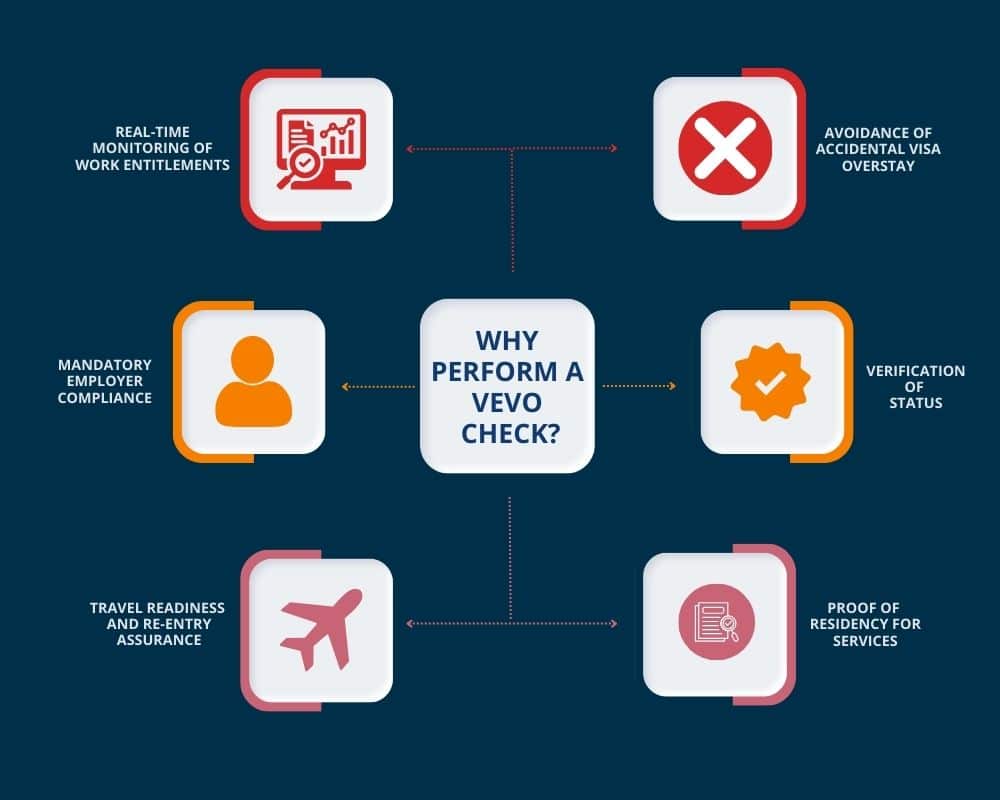
Real-Time Monitoring of Work Entitlements
Temporary employees and international students often encounter major limitations on their ability to work. The only reliable method to determine if you have unlimited rights or are limited to 48 hours every two weeks in 2026 is the Immi VEVO check. Because the DHA can virtually modify conditions without producing a new document and relying on an outdated grant letter can be a risky option.
Avoidance of Accidental Visa Overstay
Accidental overstay is a frequent reason behind visa cancellation. The Last Date of Arrival and the Visa Expiration Date are often confused by visa holders. As a result, an online VEVO check offers a precise, precise Expiration Date for your visas. Frequent checks guarantee that you apply for a bridging or renewal visa well in advance of the expiration of your present status.
Mandatory Employer Compliance and Job Security
Australian companies that hire people without legitimate work rights risk severe penalties of up to AUD $79,200 per violation under the Migration Amendment Act 2024. Therefore, a new VEVO check visa report is now required by the majority of reputable organizations every three to six months to make sure that you are legally eligible. Your employment may be lawfully terminated right away if you are unable to produce a clean report.
Verification of In-Effect Status vs. Bridging Visas
You might be on a bridging visa (bridging visa a,b,c) if you have just applied for a new Visa recently. VEVO Check only displays the visa that is In Effect. You can view the precise expiration dates of both your substantive and bridging visas, as well as their particular conditions, by performing a VEVO check login.
Travel Readiness and Re-entry Assurance
A VEVO check is a necessary checklist to verify that your Travel Facility is valid before making an overseas airline reservation. This guarantees that your travel rights have not expired for Permanent Residents, avoiding a scenario in which you are unable to board an aircraft back to Australia and left stranded outside of Australia.
Proof of Residency for Essential Services
Before finalizing transactions in 2026, banks, cellphone companies, and landlords frequently want a VEVO check to confirm your identification and duration of stay. These administrative procedures can be greatly simplified by having a PDF of your most recent VEVO result on hand.
Steps to Perform VEVO Check Online
As with the beginning of 2026, the rules and regulations made by the DHA still remains very rigid and hard so performing a VEVO check online is a mandatory requirement for any non-citizen residing in Australia to make sure that their visa remains valid and ensure their work, study and travel rights are active and not affected. Make sure to go through this guide to make sure you don’t have any confusion.
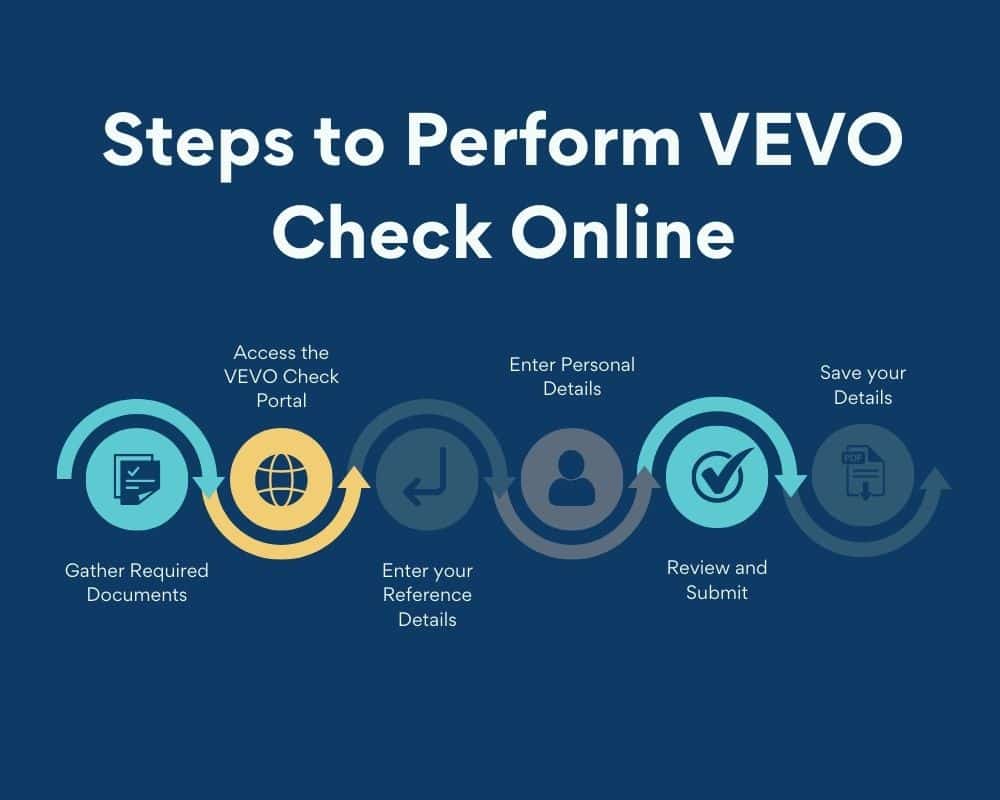
Step 1: Gather Required Documents
Before doing anything, make sure that you have the required documents that authenticate your identity and visa details are ready. You are required to have the following:
- Passport or ImmiCard
- Reference Number containing Visa Grant Number which can be found on your visa reference details or Transaction Reference Number (TRN) that can be found in your ImmiAccount.
Step 2: Access the VEVO Check Portal
After you have gathered the required documents, you must then go to the official page given by the DHA for “VEVO Check”. You can simply click on this link to redirect to the official website given by the DHA for the VEVO check and move forward: https://online.immi.gov.au/evo/firstParty?actionType=query
Step 3: Enter your Reference Details
After you have gone through the Official VEVO Check website given by the DHA and have successfully accessed the VEVO Check Portal then do the following:
- Select Document Type from the option that is suitable for you (Passport in most cases is preferred)
- Choose either “Visa Grant Number” or the “Transaction Reference Number (TRN)” from the available options.
- Carefully enter the 13-digit Grant Number or the TRN
Step 4: Enter Personal Details
After you have correctly entered your reference details, enter your personal details as per your passport.
- Enter the exact Date of Birth as per your passport
- Enter your Passport or Immicard Number
- Select the country that issued your passport
Step 5: Review and Submit
After all the above-mentioned steps have been successfully completed, make sure you check all the details and make sure to accept the terms and conditions and click the Submit button.
Step 6: Save your Details
After you have completed everything, a “View as PDF” option will be available to you to download a copy for your records so make sure to download it and use it when you required to provide your VEVO check status.
Alternatively, you can set up your myVEVO App and do your VEVO check. If you want to know how to set up and use your App then check the next section for a complete guide on setting up and using the myVEVO App without any issues.
myVEVO App
If you are someone who is an international student or an international worker who is residing in Australia and want a VEVO Check regularly then myVEVO app is the most effective and efficient way to check your status and maintain your visa compliance.
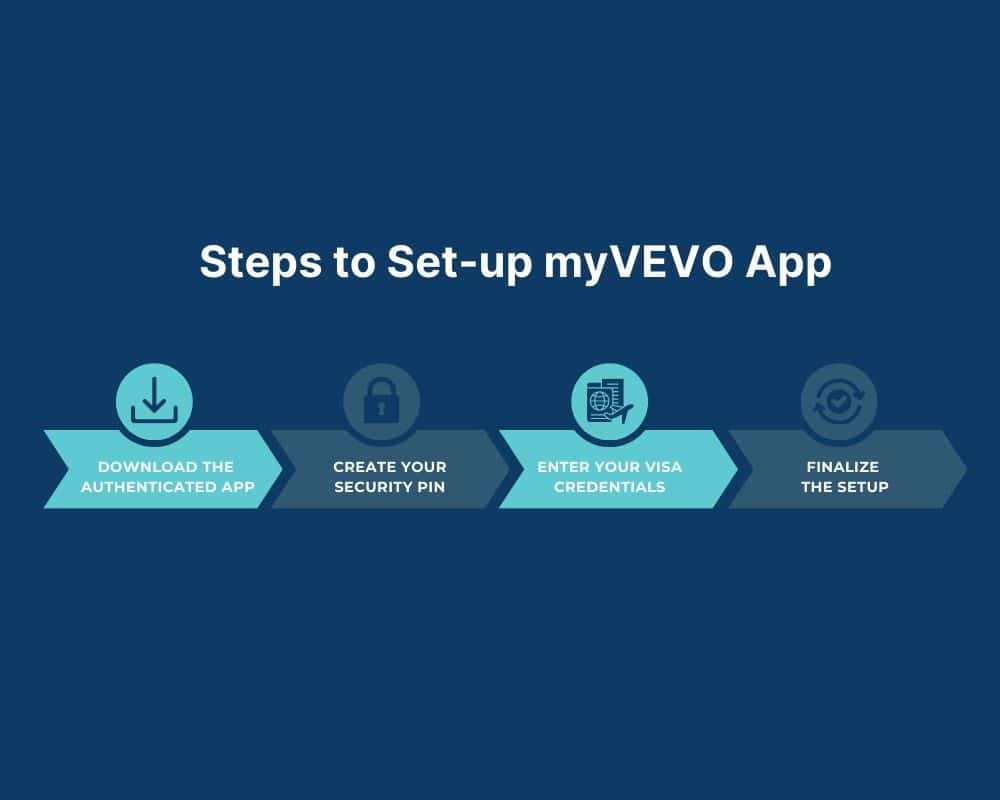
Step 1: Download the Official myVEVO app
The first step to set up your myVEVO app is to download the app from a trusted and authenticated app store and make sure that you download from the trusted developer and must be listed as the “Department of Home Affairs”
- iOS: Search for “myVEVO” or redirect from here: Apple Store
- Android: Search for “myVEVO” or redirect from here: Play Store
Note: Make sure the Developer is listed as Department of Home Affairs
Step 2: Create Your Security PIN
After you have successfully installed the myVEVO app, then upon your first time opening the app, you will be prompted to create a 4-digit PIN so make sure to create a strong PIN and safeguard it. In 2026, devices usually provide you with the facility of FaceID or Biometric sensors so you can do it if you want faster logins.
Step 3: Enter Your Visa Credentials
After creating the PIN successfully, the next step in VEVO Check with your myVEVO app will be to input the following data exactly as per your official records:
- Reference Type: Select Visa Grant Number (13 digits) or TRN.
- Date of Birth: Use the DD/MM/YYYY format.
- Passport Details: Enter your Passport Number and select the Country of Issue.
- Accept Terms: Scroll and accept the 2026 Terms and Conditions.
Step 4: Finalize the Setup
Click Submit. If the details match the DHA database, your visa status will appear, and the app will automatically “save” this profile to your PIN.
What to Do if You Forget Your myVEVO Details
If you are locked out or have lost your reference numbers, follow these recovery steps:
If You Forgot Your App PIN
For security reasons of the visa holders, the myVEVO app does not have a “Forgot PIN” reset button. So, you will then need to enter the wrong PIN three times. Then, the app will automatically clear all saved data for your protection. You will then be prompted to set a new PIN and re-enter your passport and visa grant number as if you were a new user.
If You Forgot Your Visa Grant Number
You cannot log into the app without this specific number. If you have lost your grant letter:
- ImmiAccount: Log in to your ImmiAccount; your Grant Number is listed in the “View Grant Letter” section of your application.
- Reference Request Form: If you cannot access ImmiAccount, use the official VEVO Request for Reference Number Form.
- Phone: Call the Global Service Centre at 131 881 (within Australia).
If You Have a New Passport
If you try to use the app with a new passport before notifying the government, you will get a “Record Not Found” error. Then you must update your passport details via Form 929 or through the “Update Details” tab in your ImmiAccount before the myVEVO app will recognize your new document.
Common VEVO Check Australia Errors and Fixes
When verifying your visa status, technological issues or data inconsistencies may arise even with an efficient digital system. The Department of Home Affairs tightened security measures in 2026, stressing the significance of entering data exactly as it appears in their database. The four most frequent VEVO check Australia mistakes are described in the document along with expert solutions.
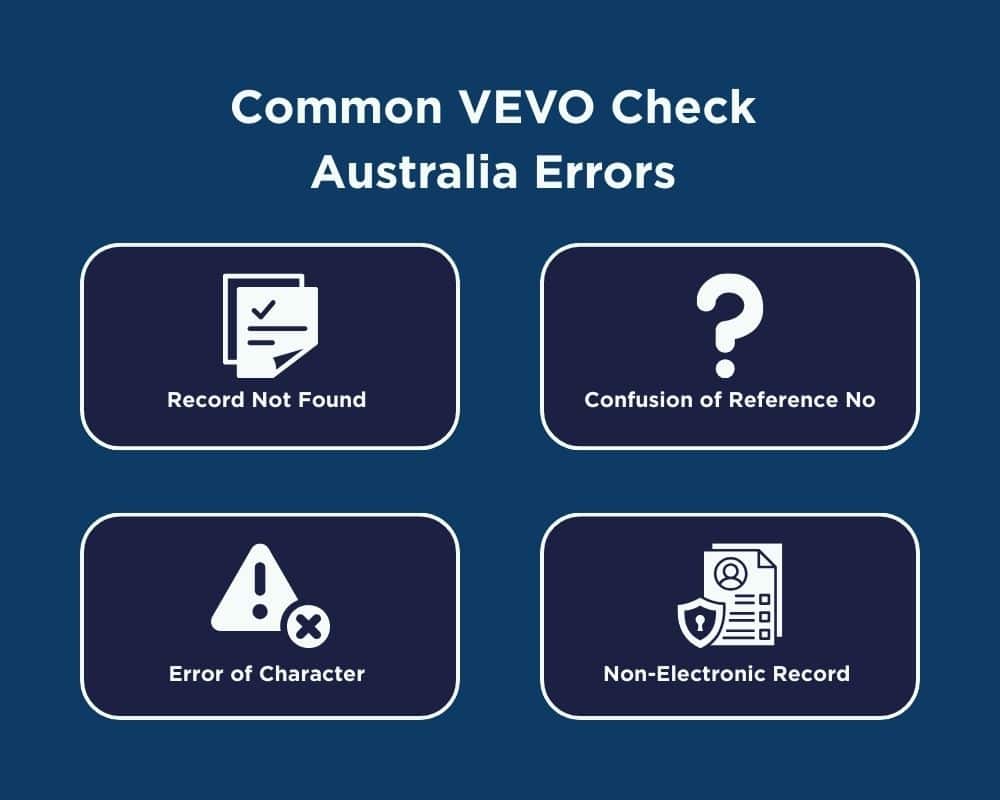
Record Not Found (Mismatched Passport Details)
This is the most common mistake of the users. It is normally experienced when the passport information in VEVO system does not correspond with the physical copy you are carrying. You have perhaps just renewed your passport. Provided you have a new passport number but have not informed the Department through either Form 929 or your ImmiAccount, accordingly, the VEVO system will continue to seek your old passport information.
The Solution: Trying the check with your previous passport number in case you have it. In case that does, you will have to update your new passport information immediately with the button of Update Details on ImmiAccount so that the next check is successful.
Confusion of Reference Number (Grant Number vs. TRN)
The immi VEVO check can be a problem for the users since they are using the incorrect form of identification number. Entering a Transaction Reference Number (TRN) in the field where the system is programmed to accept Visa Grant Number or entering an old grant number in a visa that has expired.
The Solution: Use a 13-digit Visa Grant Number of Number org in-effect visa. In case you are using a TRN, ensure that it is the one that has just been granted.
Error of Character Substitution (The 0 vs O Error)
Vevo database is very sensitive to the input of character and common typing mistakes are one of the main causes of VEVO Check log in issues. The confusion of the letter O with the number 0 (zero), and I with the capital letter I. Most of the passports of particular countries depict alpha numeric codes which cause these letters to appear the same.
The Solution: Importantly key in your passport number again. In case your passport number only has numbers, check to make sure that you did not insert any letters by mistake. See the two options (zero and the letter O) in case you are not sure of your particular format of the passport.
Non-Electronic Record (Pre-1990 Arrivals)
This mistake belongs to long-term inhabitants or permanent residents that immigrated to Australia many decades ago. Assuming that you immigrated to Australia prior to the year 1990 and have not been travelling overseas since that time, chances are that you do not have any digital record under the existing DHA system. Your visa is not more than a physical label or a piece of paper.
The Solution: This cannot be fixed through the app or the site. You would have to apply via the official Home Affairs site, a Request to obtain an Electronic Visa Record. After the DHA has manually created your digital profile into existence, you will then be able to do a vevo check online as usual.
FAQs on VEVO Check

If you want to perform your VEVO check, you must either have the myVEVO app on your Mobile device or you need to visit the official Home Affairs VEVO page then input all your credentials to have your details and complete your VEVO check.
In 2026, data mismatches are the most frequent cause of this. The VEVO system still accepts your previous passport number even if you have obtained a new one. Your new passport information needs to be updated using Form 929 or ImmiAccount. Additionally, while entering your passport number into the Vevo Check login portal, make sure the letter “O” and the number “0” are not interchanged.
No. Only in Effect visas are eligible for an online Vevo check. You must log into your ImmiAccount to monitor the processing status if you have applied for a new visa and are awaiting a response. Until the new visa is officially approved, VEVO will only show your current active visa (or active Bridging Visa).
No, a Vevo visa check only shows the terms, expiration date, and entitlements of your present visa. It’s not a log of traveling data. You must use Form 1359 to make a separate request to the Department of Home Affairs if you need your official arrival and departure records (International Movement Records).

Why Choose BJay Education and Visa Services?
Navigating the 2026 Australian migration landscape requires more than just a search, it requires registered expertise. At BJay Education & Visa Services, we bridge the gap between your current status and your future goals.
Registered Expertise: Led by Jaya Prakash Oli (MARN: 1570827), our team provides legally sound, OMARA-regulated advice.
Proven Results: We have successfully assisted over 10,000 clients from 20+ countries with university admissions, 485 Graduate Visas, and PR pathways.
Total Settlement Support: From Professional Year (PY) enrollments to post-arrival career guidance, we are with you long after your visa is granted.
Get Expert Help With your VEVO Check. Book a Free Non-Obligatory Consultation!